 High rated, unique content, community-driven server


Players Online: 122
Record players online: 124
(Achieved on November 10, 2026)
Game Version: v111
EXP Rate: Up to 125,000x
Meso Rate: Up to 125,000x
Drop Rate: Up to 125,000x
Date: November 10, 2026
Time: 12:45:33 (CEST)

Database
This is still a work in progress — some information is still missing or incomplete. Got a question? Feel free to ask in our Discord!
« Back to Database
F12 Widgets
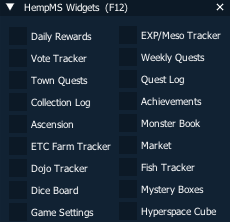
Press F12 in game to open the widget menu. Every window you know from the @commands (like @box or @tracker) is now also a widget that floats on top of the game: move it, resize it, keep a few open while you play.
The widget menu
F12 shows the menu with every widget - click a name to open it. The menu also lets you Lock position (the widget can no longer be dragged by accident) and set the opacity of each widget.
Why use the widgets?
- Works on any PC - no in-game browser window needed, so no blank or broken pages.
- Live updated - numbers refresh by themselves while you play.
- Developed further - new features land in the widgets first.
- The old @commands (
@box,@tracker,@dailyand so on) now open the matching widget.
All widgets
| Widget | Old command | What it does |
|---|---|---|
| EXP / Meso Tracker | @tracker | Live EXP, meso and kills per hour, with start / pause / reset. |
| Daily Rewards | @daily | Your daily login calendar - see and claim today's reward. |
| Weekly Quests | @week | This week's quests and your progress on each. |
| Quest Log | @quests | All your active quests and what is still left to do. |
| Town Quests | @townquest | Town quest progress per town. |
| Achievements | @achievement | Every achievement with your progress and rewards. |
| Collection Log | @clog | Which collection items you found and which are still missing. |
| Monster Book | @mb | Your Monster Book cards and set progress. |
| Ascension | @ascension | Your Ascension tier, progress and the next tier's bonuses. |
| Market | @market | Browse and filter the player market, with item icons. |
| Dojo Tracker | @dojotracker | Live Dojo run stats, with saved tracker sessions to compare runs. |
| Fish Tracker | @fishtracker | Worms, catches, coins and net result per hour. Use Settings to pick what it shows. |
| Mystery Boxes | @box | Open your boxes with the prize reel; new boxes and keys show up within seconds. |
| Dice Board | @diceboard | Play the Dice Board and see your position and rewards. |
| Hyperspace Cube | @pgb | Roll and lock your Hyperspace Cube lines. |
| Game Settings | @effect @loot @npc @indicator | All your game settings in one window - see Game Settings below. |
| ETC Farm Tracker | @etctrack | Up to 8 items of your choice: how many you have, how many you gained this session, your rate per hour and an optional goal bar. START, PAUSE and RESET the session in the widget. |
| Getting Started | - | New players only: the 23-step starter tour. Opens by itself on login - see Getting Started below. |
| Vote Tracker | @vote @claimvote | Your votes today, the next vote's reward, your month vote streak (2x / 3x) and rewards waiting to be claimed - with VOTE, CLAIM REWARDS and OPEN VOTE SHOP buttons. See Vote Tracker below. |
Game Settings
The Game Settings widget puts every setting in one window. Click a checkbox and it is saved right away.
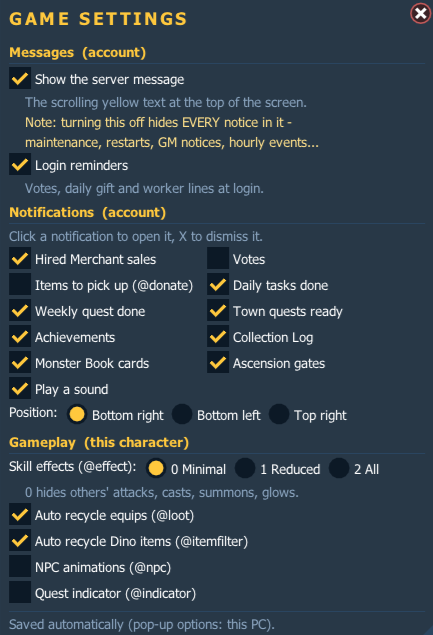
| Setting | Saved for | What it does |
|---|---|---|
| Show the server message | Account | The scrolling yellow text at the top of the screen. Careful: turning it off hides every notice in it - maintenance, restarts, GM notices and the hourly events. |
| Login reminders | Account | The votes left, daily gift and gathering worker lines you get when you log in. |
| Notifications | Account | Pop-ups for votes, items to pick up (@donate), daily tasks, weekly quests, town quests ready, achievements, Collection Log, Monster Book cards, Ascension gates and Hired Merchant sales (see below) - each on or off, with an optional sound and a choice of position: bottom right, bottom left or top right. |
| Skill effects | Character | Same as @effect: 2 = all, 1 = hide other players' attacks, 0 = hide as much as possible (helps a lot against crashes in busy maps and Trials). |
| Auto recycle equips | Character | Same as @loot. |
| Auto recycle Dino items | Account | Same as the Dino toggle in @itemfilter. |
| NPC animations | Character | Same as @npc. |
| Quest indicator | Character | Same as @indicator. |
| Boss marker | Character | A red box with the boss's HP % around every boss, so you can find it under all the skill effects. When the boss is off-screen, a red arrow at the screen edge points to it. Totems, barriers and boss summons are not marked. |
The old commands keep working and show the same setting. The pop-up sound and position are saved on your PC.
Vote Tracker
- Shows your 10 votes of today (the 1st gives the Silver Box and Key, the dice votes are marked), what your next vote gives and when the daily reset is.
- Shows your vote streak of this month: how many days until 2x Silver Boxes, Keys and Game Dice, and whether your 1 free missed day is still available.
- VOTE opens the vote page in your browser, already logged in. New votes show up in the widget within a few seconds.
@voteopens both the vote page and the Vote Tracker.- CLAIM REWARDS gives you the stored Silver Boxes, Keys and Game Dice (same as
@claimvote). - OPEN VOTE SHOP opens the Vote Point shop (same as
@vpshop).
Brand-new players get the Getting Started tour: a widget that opens by itself when you log in and walks you through 23 simple steps, from your first job to placing a Frenzy Totem. Every step explains what to do and gives you +1 level. Steps can be done in any order, and finishing the whole tour gives a 2 hour EXP buff.
The tour is for new accounts on a PC that has never played HempMS before. It disappears once you finish it or pass total level 2,500. Closed it? Open it again from the F12 menu.
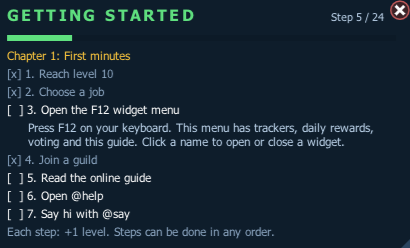
First minutes
- Reach level 10
- Choose a job
- Open the F12 widget menu
- Join a guild with
@guild - Read the online guide (
@guide) - Open
@help - Say hi with
@say
Level fast
- Use
@training - Spend your ability points (
@ap) - Turn on auto attack (
@at) - Claim a
@questsreward - Check out
@bonus- reward: +1 hour EXP buff - Reach level 120
Daily routine
- Claim the daily login reward (
@daily) - Vote once (F12 → Vote, or
@vote) - Open a Silver Box (
@box) - Visit the market (
@ah) - Visit the DP market (GO TO MARKET → Kanna) - reward: 10 Red Cubes
- Cube an item at Fredrick
Play together
- Join an event (
@joinevent) - reward: 5 Spell Traces - Look at the bosses (
@boss) - Visit Mu Lung Dojo (
@dojo) - Place your Frenzy Totem
ETC Farm Tracker
@etctrack <item name or id> [goal]adds an item, for example@etctrack Stiff Leather 500. Run it again with a new goal to change the goal.@etctrack remove <name or #>removes one,@etctrack clearempties the list and@etctrackshows your list. Up to 8 items; equips can't be tracked.- START begins a session: from then on the widget counts what you gained and your rate per hour. PAUSE stops the clock, RESET starts over.
- Reach a goal and you get a pop-up (with sound if you turned it on). Turn it off under Notifications in Game Settings.
- Unlike
@indicator, it keeps working after the related quests are finished. Your list is saved per account.
Notifications
With the widgets running you get a pop-up when something happens - click it to open the matching widget right away, or click the X to dismiss it. Pop-ups disappear by themselves after about 12 seconds (hovering keeps them up).
| Pop-up | Clicking opens |
|---|---|
| A vote was credited | Vote Tracker |
| Items waiting for you (GM send, compensation, donation) | The @donate NPC |
| All daily tasks done | Daily Rewards |
| A weekly quest done | Weekly Quests |
| Town quests ready to turn in (checked every minute) | Town Quests |
| Achievement unlocked | Achievements |
| New Collection Log entry | Collection Log |
| Monster Book card complete | Monster Book |
| Ascension gate broken | Ascension |
| Hired Merchant sale | Market |
| ETC tracker goal reached | ETC Farm Tracker |
| Getting Started step done | Getting Started |

Each kind can be turned off in the Game Settings widget. The chat messages stay either way.
Hired Merchant pop-ups
- When your Hired Merchant sells an item, a pop-up shows it in the corner of your screen - on any character of your account, not only the one that owns the merchant.
- Sold something while you were offline? About 8 seconds after you log in, you get one summary of everything that sold while you were away.
- Don't want the pop-ups? Turn them off in the Game Settings widget - you can also pick a sound and where they show. The sale message in your chat stays.

Tips
- Each widget remembers its position, size, lock and opacity.
- Close a widget with the red X in its corner, or press F12 again to hide them all.
- Playing on more than one client? Every client shows the widgets of the character logged in on that client.